

Stem Extraction Tools v3 BETA
LiteLABS v3 has moved on quite a bit since the first BETA release.
The original v3 update introduced much more detailed stem separation, including parent stems such as Vocals, Percussion, Bass, Strings, Keys and Other, alongside experimental breakdowns such as Lead Vocals, Backing Vocals, Kick, Snare, Toms, Hi-Hats, Cymbals, Wind / Brass and Saxophone.
Since then, we’ve reworked both the extraction system and the user interface around one goal:
Give users the stems they actually need, without forcing every extraction into one enormous pack.
New extraction packs
LiteLABS can now offer different preset packs depending on your account permissions.The available packs are supplied directly by the LiteLABS processing server, so the list can evolve as our models and separation tools improve.
Current BETA presets include:
Basic
- Instrumental
- Vocals
- Vocals
- Percussion
- Bass
- Strings
- Keys
- Other
- Lead Vocals
- Backing Vocals
- Kick
- Snare
- Toms
- Hi-Hats
- Cymbals
- Bass
- Strings
- Keys
- Other
- Wind / Brass
- Saxophone
A completely redesigned extraction workflow
The Stem Extraction Tools interface has been rebuilt into a simpler step-by-step process.You now:
- Upload or drag and drop your audio file.
- LiteLABS analyses the track locally.
- Choose an available extraction pack.
- Choose MP3 or FLAC and confirm the credit cost.
- Follow the live extraction progress.
- Download the finished stem pack.
Drag & drop uploads
You no longer have to use the file picker.Audio can now be dragged directly onto the upload area.
Supported source formats remain:
- MP3
- WAV
- FLAC
- M4A
Faster track analysis
LiteLABS now reads track duration locally in your browser rather than uploading the entire file just to inspect its metadata.For most tracks this takes only a moment.
This also avoids unnecessarily uploading large files twice.
Larger files and automatic credit scaling
LiteLABS now handles longer audio much more gracefully.Instead of simply preventing longer uploads, files are processed in 15-minute chunks. The credit charge shown before extraction reflects how many chunks are required.
So if you upload a longer mix, compilation or extended recording, LiteLABS automatically adjusts the displayed credit cost rather than simply rejecting it because of duration.
Large source files are also uploaded in smaller chunks behind the scenes, which makes bigger uploads more reliable and avoids relying on one huge web request.
Different pack pricing
Different extraction packs can now have different credit costs.This means a smaller two-stem extraction does not have to be treated the same as a much more demanding detailed separation.
Pricing and pack access may also vary depending on your LiteRECORDS account.
Smarter queue behaviour
You no longer need to keep refreshing the page when another extraction is using the worker.LiteLABS checks availability automatically via AJAX and updates the interface when the queue becomes available.
Better processing feedback
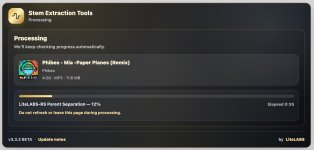
The processing screen now shows:- track information
- current processing stage
- progress
- elapsed time
Improved README files
README files are now standardised across preset packs and include useful information such as:- track
- selected extraction pack
- output format
- included stems
Automatic feedback requests
After a successful extraction, selected users may receive a LiteBOT conversation asking for feedback.The review form feeds back into our testing and research process, helping us decide which models, stems and separation techniques are genuinely worth keeping.
PRO benefits
The widget can also display LiteLABS upgrade benefits directly to eligible members.Depending on current settings, PRO may offer benefits such as:
- lower extraction credit costs
- shorter cooldowns
- larger upload limits
- additional extraction packs or formats
Still BETA
The BETA label is mainly there because the detailed stems and model combinations are still being tuned.The core extraction system is usable, but we are continuing to test model weights, processing order, instrument detection and the usefulness of some of the deeper stem breakdowns.
The goal remains the same: not simply to produce more stems, but to produce stems that are actually useful.
We are constantly trying to upgrade all of our services and features so please do let us know where we can improve.
