What's new
LiteRECORDS

Register a free account today to become a member! Once signed in, you'll be able to participate on this site by adding your own topics and posts, as well as connect with other members through your own private inbox!

  • Guest, before your account can be reviewed you must click the activation link sent to your email account. Please ensure you check your junk folders.
    If you do not see the link after 24 hours please open a support ticket.

Powerful New Vocal Remover AI - Instructions

I honestly can't tell the difference in audio quality between 512 and 320. I think 512 is fine for the majority of lossless songs. 272 took almost 4 hours on my MBPRO.

272 may not sound too different for some songs. But for others it can make a difference. I spend around 3.5 to 4 hours on a conversion.
 
Great job, [MENTION=39673]Anjok[/MENTION]! I'm happy with using UVR. Recently I built a new system (based on AMD Ryzen 5 2600 with 8 GB's of RAM). I need to upgrade my graphics card, because the one I've been using for about 10 years is dying... Processing a song takes about 5-9 minutes (@320 window size). I want my new graphics card to be as cheap as possible (I'm not a gamer), so I decided to get some NVidia GT 1030 2GB card. Will I be able to use the "GPU Conversion" option with that card and will it be any faster than the "CPU Conversion" on my Ryzen 5 2600 machine? Any help would be highly appreciated. Stay safe, guys!
 
Last edited by a moderator:
Great job, [MENTION=39673]Anjok[/MENTION]! I'm happy with using UVR. Recently I built a new system (based on AMD Ryzen 5 2600 with 8 GB's of RAM). I need to upgrade my graphics card, because the one I've been using for about 10 years is dying... Processing a song takes about 5-9 minutes (@320 window size). I want my new graphics card to be as cheap as possible (I'm not a gamer), so I decided to get some NVidia GT 1030 2GB card. Will I be able to use the "GPU Conversion" option with that card and will it be any faster than the "CPU Conversion" on my Ryzen 5 2600 machine? Any help would be highly appreciated. Stay safe, guys!

I'd personally advise getting 1050 with 4GB at least. (unless the price difference is huge)
That's what I have and at the best Windows size (272) a song takes about 2-3 mins, while at 320 under a minute. I find it not slow at all.

Also, mine is on a laptop so I'd guess the desktop version of that chip would be more powerful? Not sure.
 
I'd personally advise getting 1050 with 4GB at least. (unless the price difference is huge)
That's what I have and at the best Windows size (272) a song takes about 2-3 mins, while at 320 under a minute. I find it not slow at all.

Also, mine is on a laptop so I'd guess the desktop version of that chip would be more powerful? Not sure.

Thank you, djtayz for your suggestion and experience. These processing times are impressive. I also thought about GTX 1050 Ti 4GB as a second option. And I think this will be the right choice for me. :)
 
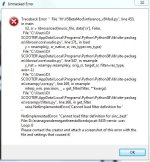
anybody know how to fix this

File "VocalRemover.py", line 10, in <module>
from PIL import Image
ModuleNotFoundError: No module named 'PIL'


i am trying to install the GUI in to a PC which consists of

Win 10
16g Ram
Nvidia Geforce GTX 1660 graphics card
AMD Ryzen 5 2600 six core processor

with everything installed when the shortcut for the GUI is pressed the page flashes up for a second then disappears and main interface does not show up.

i have it installed in a laptop but is not fast...any ideas

TIA
 
Last edited:
anybody know how to fix this

File "VocalRemover.py", line 10, in <module>
from PIL import Image
ModuleNotFoundError: No module named 'PIL'


i am trying to install the GUI in to a PC which consists of

Win 10
16g Ram
Nvidia Geforce GTX 1660 graphics card
AMD Ryzen 5 2600 six core processor

with everything installed when the shortcut for the GUI is pressed the page flashes up for a second then disappears and main interface does not show up.

i have it installed in a laptop but is not fast...any ideas

TIA

You need to go back to the main post and watch the youtube video for the part that shows how to set up ffmpeg.
Also download the ffmpeg I have posted in the main post. Tag Anjok if you need help sooner by putting an "@" before his name.
 
Thanks i fixed that! All this time it was taking over 20 min per song using only my i7, now it takes 50 seconds with my graphics card.
 
I have a 2012 MBPRO 2.5 i5 takes about 30 min for an average song. I haven't tested the graphics processor I would think that would be slower?
I tried the last tweak (window size) and it took 2 hours and could not really tell the difference from the same 30 min one.

Has there been any news on working on the vocals making side of things?
 
Hey guys!

I know it's been a minute since I've updated this thread. I wanted to let everyone know that v5 of the vocal remover is in development and BIG changes are being made! New GUI, new models, and new options will be included. The models will be a major step up from every model previously released. I will be releasing a beta v5 model sometime near the end of the week, so I'll keep everyone posted!
 
Hey guys!

I know it's been a minute since I've updated this thread. I wanted to let everyone know that v5 of the vocal remover is in development and BIG changes are being made! New GUI, new models, and new options will be included. The models will be a major step up from every model previously released. I will be releasing a beta v5 model sometime near the end of the week, so I'll keep everyone posted!

Very awesome news!! Thanks Anjok
 
The first v5 Beta Models are here! I provided 2 from the same training session for further testing and comparison. This model will likely be fine-tuned after a few weeks, so we may release a third beta model for testing if it's worth it. Just to reiterate, these models are not compatible with the v4 GUI, you must use the version I included in the link below to test!

Before moving forward, please read the following:

1. Open your command prompt and run pip install librosa --upgrade & pip install samplerate
2. There is no need to remove or make changes to your current version of the v4 GUI. This v5 Beta model GUI should be treated as a separate application entirely. Extract these files to a brand new directory!
3. These models process at a sampling rate of 32000. Models for 44100 are still in training and will be included in the final release.
4. We are still working to improve the quality of the models for the final release of v5. While these 2 models perform very well, we're shooting for even better performance. Feedback is very much welcome! The model structure and backend code are still subject to change quite a bit between now and the final release.
5. This GUI is not at all indicative of the final version! In fact, this version is being phased out completely and will be replaced with an amazing new version (along with all of the new models) in the final release.
6. v5 will also include a Karaoke model, BV remover model, stacked models (although the stacked models will take some work this time around), and hopefully, a vocal model.
7. We greatly appreciate everyone's patience! Testing, training, researching, and building this takes a lot of time. Our target release date is still before the end of Q2 2021.
8. Enjoy!

Link to v5 Beta Model - http://www.mediafire.com/file/wfy4oxo02umzueh/V5BetaMod.zip/file

 
Last edited: