What's new
LiteRECORDS

Register a free account today to become a member! Once signed in, you'll be able to participate on this site by adding your own topics and posts, as well as connect with other members through your own private inbox!

  • Guest, before your account can be reviewed you must click the activation link sent to your email account. Please ensure you check your junk folders.
    If you do not see the link after 24 hours please open a support ticket.

Powerful New Vocal Remover AI - Instructions

thanks man, so does this extract a good quality acapella to or is it mainly focused on getting a near perfect inst? im using splitter ai at the moment , would this get better results with acapellas? as im more into making my own beats so no use for inst, thanks.

Yes, it's better than spleeter, but for acapellas Demucs is the best one. This AI is mainly focusing on making instrumentals sound official, not getting studio quality acapellas (though it's nearing that also).
 
Yes, it's better than spleeter, but for acapellas Demucs is the best one. This AI is mainly focusing on making instrumentals sound official, not getting studio quality acapellas (though it's nearing that also).

Still need that tutorial for using Demucs. :p
 
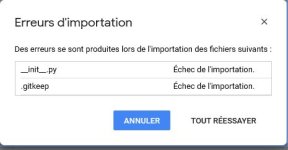
I'm so interested in this but both methods failed for me. Even the google one supposed to be simple.
At step one when I upload the folder on my google drive, it states 2 files cannot be uploaded.
 
I'm so interested in this but both methods failed for me. Even the google one supposed to be simple.
At step one when I upload the folder on my google drive, it states 2 files cannot be uploaded.

Can you screenshot what exactly it tells you? And have you checked if you have enough space on your Drive
 
***Update***

First off I just want to say thank you to [MENTION=10167]NewAgeRipper[/MENTION] for doing an excellent job on the tutorial and for the shout-out!

I'm ironing out some bug in the update and it should be released sometime this week for sure! I'm trying to make sure that all of my future releases can be universally run with no issues before releasing them. I've had some help from a gifted Python coder to help bring my vision for GUI to life and I'm VERY happy with the options we were able to add to make it the best!

To clarify, the stacked model was trained on pairs consisting of conversions of mixes and official instrumentals. The point was reduce the vocal pinches and audio static in some tracks. The model works best when a track is run through it more than once and that is where the "Stack Passes" option comes in. The amount of conversion passes needed to reduce the vocal pinches will vary from track to track.

Regarding the possibility of having an AI that keep background vocals for karaoke tracks - I'm not entirely sure how effective it would be considering how I would train the AI to keep them in. The results are not consistent enough. This is something that will need to be thoroughly tested and will require a lot most research.
 
thanks man, the best one ive heard so far is phonicmind but its not free but the preview was the cleanest so far but still not perfect, is demucs better than phonic mind?
 
thanks man, the best one ive heard so far is phonicmind but its not free but the preview was the cleanest so far but still not perfect, is demucs better than phonic mind?

Never heard of phonicmind. Do you have a weblink? just don't put the whole link in. Example: use h**p://example dot com.
 
hey mate, just google phonicmind , one word its the first result, i have never used it or payed to use it just the other night i threw a track into it and it gives you a little preview like 20 seconds of each stem online, they sounded better than all the other free ones, but this demucs sounds very interesting.
 
hey mate, just google phonicmind , one word its the first result, i have never used it or payed to use it just the other night i threw a track into it and it gives you a little preview like 20 seconds of each stem online, they sounded better than all the other free ones, but this demucs sounds very interesting.

Phonicmind used to be the best because it had no rivals, but just for 2-3 years things have changed. A lot of tools are better than Phonicmind, including this one and Demucs.

The stems that it extract sound very unconfident - the drums have a lot of bleed and are mixed with some synths, the bass is okay, and the vocals are also just fine.
 
thank you mate, so when you say the stems have a lot of bleed are you refering to phonicmind or demucs? i dont have google drive or anything but i think i am going to set it up so i can use demucs.
 
thank you mate, so when you say the stems have a lot of bleed are you refering to phonicmind or demucs? i dont have google drive or anything but i think i am going to set it up so i can use demucs.

He means phonicmind has bleed. Demucs by [MENTION=26971]djtayz[/MENTION] is way better.
 
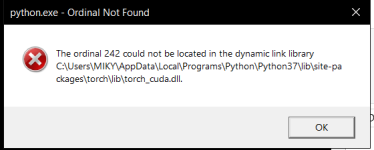
Hello! I followed all the instructions and installed everything but when I try to launch the vocal remover I get the following error:

error.png

I tried reinstalling Python and all the files but it didn't solve the issue. I don't have any experience with Python so I'd appreciate if anyone could help me with this issue.