What's new
LiteRECORDS

Register a free account today to become a member! Once signed in, you'll be able to participate on this site by adding your own topics and posts, as well as connect with other members through your own private inbox!

  • Guest, before your account can be reviewed you must click the activation link sent to your email account. Please ensure you check your junk folders.
    If you do not see the link after 24 hours please open a support ticket.

Powerful New Vocal Remover AI - Instructions

A nice feature I think would be to enable drag and drop to select music files, instead of clicking the button and selecting them from the prompt.

Also a question - does the multiple file conversion work only if you initially select many files or it can also work if you first select one, then click the button again to add another which is in a different folder?
 
A nice feature I think would be to enable drag and drop to select music files, instead of clicking the button and selecting them from the prompt.

Also a question - does the multiple file conversion work only if you initially select many files or it can also work if you first select one, then click the button again to add another which is in a different folder?

That's an excellent idea, I'll see what I can do about having this option added sometime in the future. It'll take sometime before I'm able to because I'm still getting comfortable with Tkinter.

The code for the GUI is wide open so you are all free to make as many changes to it as you'd like.
 
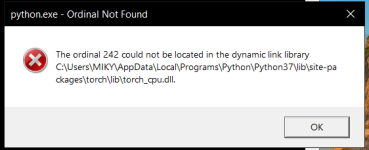
I installed the Cuda driver linked in the post but during the installation I did get a pop-up saying the installer couldn't find an appropriate driver and some functions may not work properly. I removed the driver and installed the CPU version and now I'm getting another error:

View attachment 658

I unfortunately still haven't managed to get it to work. I tried looking for a solution on my own and I haven't been able to figure it out. If anyone could help me I'd be grateful.
 
NAR: , IMO

You can spend 5 hours removing blips with ML, or run it through a gate in 5 minutes.

Again, You can spend 5 hours separating BVs with ML, or run it through AOM Stereo Imager D in 5 minutes.
 
Last edited:
I honestly don't know what ML and AOM is.

He's (probably) referring to using Machine Learning techniques to manually isolate background vocals, which indeed could take a long time, or use an effect to extract them. You already know how the second one works, as it was in your Colab tutorial, it's a matter of removing the mono signal (Adobe Audition does the same thing).

The first one can be done using apps like Melodyne or Inifnity. I've used them both and most of the time they do a decent job, when Audition fails. It separates the vocals as best as it can into notes so you select the ones that you don't need (in this case the notes of the lead vocal) and remove them.
 
Ultimate4 Vocal Remover has finally worked for me with Google Colabs method. Thanks @Anjok, @djtayz <3
Also thank you @NewAgeRipper for your amazing video tutorial!! It couldn't be posible without it.

I'd like to try demucs too, because I want to compare results myself and have some stems. Is there any similar tutorial?
 
Last edited:
I have used it a couple of times but I would like to have it installed as it would be easier to use and I could use the stack model to clean up the instrumental.

I'll try and help if I can. Try to start fresh, delete everything you've installed and start from scratch. Are you using Windows 10?
 
I'll try and help if I can. Try to start fresh, delete everything you've installed and start from scratch. Are you using Windows 10?

Yes, I'm using Windows 10. I removed everything and installed from the beginning and I'm still getting this error.
error2.png
 
Can i run Stacked Model again and again and again til voice complete disappears?

The overall quality will drop significantly. It's not a magic feature that only removes vocal bleed, it also can damage the synths and ambience of a song.

Not to say you can't experiment and see for yourself if you're curious then go for it.
 
Can i run Stacked Model again and again and again til voice complete disappears?

The first pass is generally the best. Then the results diminish with each additional pass.
It will only strip the frequencies it identifies, so some parts of vocal will not be removed no matter how many passes.
For that reason, I'm thinking there may be benefit to developing more than one Stacking Model.

But in general, what I do, and if you're willing to put in the time... is to go through each individual vocal track created, listen to what's there, and mute out only the parts that you can really hear the vocals. Keep all the rest, as that is scattered instrumentation and ambiance. Each additional pass will take out less vocal and more instrumentation ... but certain parts of a song, like a few seconds worth, could benefit from 5+ passes, or even 10.. just not the whole song. So you mute out those few seconds in the stems and mix the rest of the sound back into the instrumental.

In general though, using the Stacking Model at least once will mostly always provide superior results to not using it. Just so long as you are willing to put in the extra time deciding what to mute out and what to mix back in.
 
I'd like to try demucs too, because I want to compare results myself and have some stems. Is there any similar tutorial?

I have not had time to make a separate tutorial for Demucs. But it's basically the same thing as Vocal Remover. Just download the files needed. Put the folder needed in your Google Drive and the small file needed. Upload both the folder and the small file. Each time you open Google Colab it will show you the files used for each Vocal Remover and Demucs. You click the one you want to use and then go through each step click the play button as you go down the list. In Demucs it takes a little while for ffmpeg to install. After that you're on your way.
 
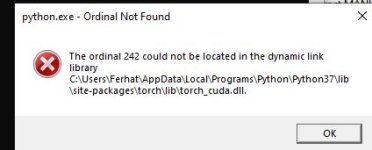
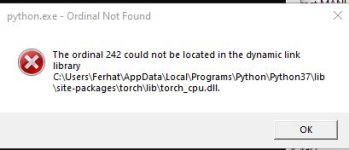
i followed step by step how to install and run on windows but does not work unfortunately., i get error popup boxes like thistorch cpu error.JPG

torch cuda error.JPG
 
i followed step by step how to install and run on windows but does not work unfortunately., i get error popup boxes like thisView attachment 660

View attachment 661
I agree with chilin. Try the Google colab version. Also in the upper left of the colab page after setting up there's a runtime button, you can click and scroll down to change runtime to GPU to get even faster conversions sometimes. Just follow my video on the main post. Super simple.